Bridge Linear and Telegram Instantly and Securely.

A secure, 2-way sync with smart identity mapping, command center and topic-based comment threads. Build for fast-moving engineering teams at agencies and startups.

Add to Linear

Already using LinBot? Login to Console

A
Alex
Telegram • Just now
/issue Prioritize the database migration -p urgent -a me
ENG-402Urgent
Prioritize the database migration
A
Assigned to Alex
S
Sarahleft a comment

I'm on it! Started the migration scripts. 🚀

S
Sarah (via Linear)
Telegram • Just now
I'm on it! Started the migration scripts. 🚀
Key Feature Grid

Smart unfurling

Paste a Linear URL or type an issue ID, and LinBot instantly converts it into a rich preview card.

Two-way syncing

Threaded conversations, status changes, and priority updates stay perfectly synced in real time.

Bot commands

Create issues, reassign team members, and search your backlog without ever leaving the chat.

File uploads

Attach screenshots or documents directly to Linear tickets by simply uploading them in Telegram.

M
Mike
Telegram • Just now
/search -s backlog
LinBot BOT
Telegram • Just now

Backlog Results:

AWS Migration docsENG-45
Legacy DB CleanupENG-12

Get Connected in under 3 minutes.

No complex webhooks or messy configurations. Just link, authorize, and start shipping.

1. Install app

Install LinBot to your Linear workspace and log into our console.

2. Get bot token

Create a quick bot via @BotFather in Telegram and grab your token.

3. Map it out

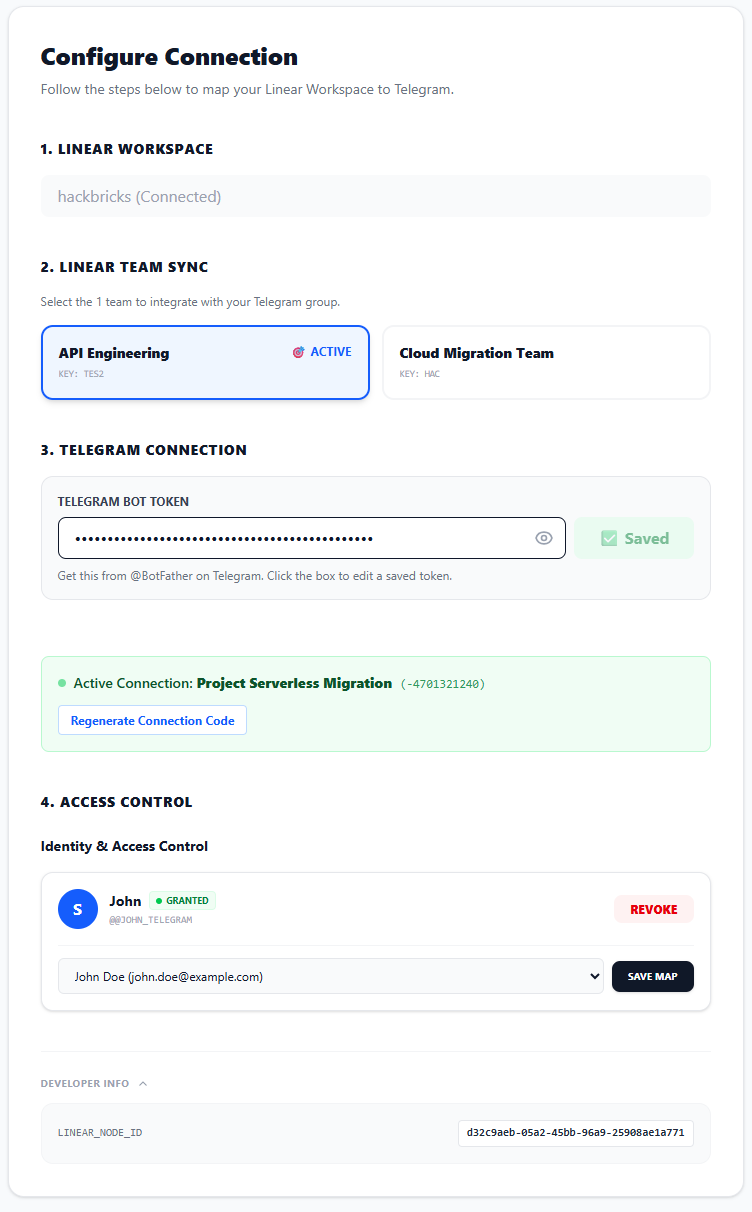
Select your Linear team inside the console to generate your connection code.

4. Start shipping

Paste the secret code into your Telegram group, map your users, and you're live.

Console Preview

LinBot Console Preview

Simple, Transparent Pricing

Pro Plan

$19 / month
  • 1 Telegram Group To 1 Linear Team (Swappable Anytime)
  • Smart Unfurling
  • Full Commands (/search, /comment, /assign etc)
  • Two Way Thread Sync (Telegram Topics Must Be Enabled)
  • Screenshot Uploads
  • Console Access
  • Unlimited Users And Access Controls Mappings
Get Started

30-day money-back guarantee if you don't like it

FAQ

Linear Admin Required
To securely map your workspace, the user installing LinBot must have Admin privileges in your Linear workspace for the initial authorization.
Telegram Groups and Supergroups
If you want to use 2 way chat sync between Telegram and Linear then your Telegram group must have Topics (Forum features) enabled. This allows the bot to create clean, isolated threads for every Linear ticket instead of clogging the main chat.
Bot Permissions
When you add your custom bot to your Telegram group, you must promote it to an Admin with permissions to Manage Topics and Delete/Pin Messages.
Can I switch my team later?
Yes! You can instantly switch which Linear Team your Telegram group syncs to at any time from the LinBot console.
Does LinBot work with Private Teams?
Yes! You can immediately create, search, unfurl, and update issues in Private Teams right out of the box. However, because Linear heavily restricts automated webhooks for Private Teams to protect your data, the real-time 2-way chat sync feature requires one extra step. Once you sign up, just ping our support, and we'll hand you a secure webhook URL to unlock full 2-way syncing for your private team in 60 seconds!